

Sell Samsung Galaxy S25 Ultra Without Inspection Surprises
A Galaxy S25 Ultra can look almost new until you spend ten minutes testing it. The screen may be free of cracks, but one camera struggles to focus. The S Pen may be missing from its slot. A faint app outline may appear against a plain background, or the USB-C connection may cut in and out when the cable moves.
Those details can change a quote after inspection. A Galaxy S25 Ultra trade-in price is based on the phone that arrives, so appearance alone doesn’t give you the full S25 Ultra value. Storage, carrier status, function, accounts, and financing can affect the result too.
If you plan to sell a Samsung Galaxy S25 Ultra, test it before selecting a condition. This article gives you current live prices and a model-specific check for the display, cameras, S Pen, charging, and account status. It covers only the S25 Ultra, not the S25, S25+, or S25 Edge.
How Much Is a Galaxy S25 Ultra Worth?
When checked on September 4, 2026, the highest SmartphonesPLUS offer for a Galaxy S25 Ultra was $646 for an Unlocked 1TB phone in Flawless condition.
That maximum applies to one configuration. Samsung sells the Galaxy S25 Ultra with 256GB, 512GB, or 1TB of storage. Confirm your capacity under Settings> About phone instead of relying on what you remember buying. The live table shows how storage, carrier, and condition can change the S25 Ultra value.
| What it shows | Storage | Carrier | Condition | Product details | Current live offer |
| Storage comparison | 256GB | Unlocked | Good | Product details | $500 |
| Storage comparison | 512GB | Unlocked | Good | Product details | $535 |
| Storage comparison | 1TB | Unlocked | Good | Product details | $585 |
| Carrier comparison | 256GB | AT&T | Good | Product details | $426 |
| Carrier comparison | 256GB | Verizon | Good | Product details | $375 |
| Carrier comparison | 256GB | T-Mobile | Good | Product details | $376 |
| Condition comparison | 256GB | Unlocked | Flawless | Product details | $535 |
| Condition comparison | 256GB | Unlocked | Fair | Product details | $331 |
| Condition comparison | 256GB | Unlocked | Broken | Product details | $116 |
| Nonworking example | Not selected | Not selected | No Power | Product details | $0 |
Prices update automatically with the SmartphonesPLUS feed. The Galaxy S25 Ultra trade-in amount can change with resale demand, so use the row matching your phone instead of saving one number for later.
The No Power option didn’t have a cash offer when checked, while a Broken phone that still powers on may have one.
What Will Inspection Check?
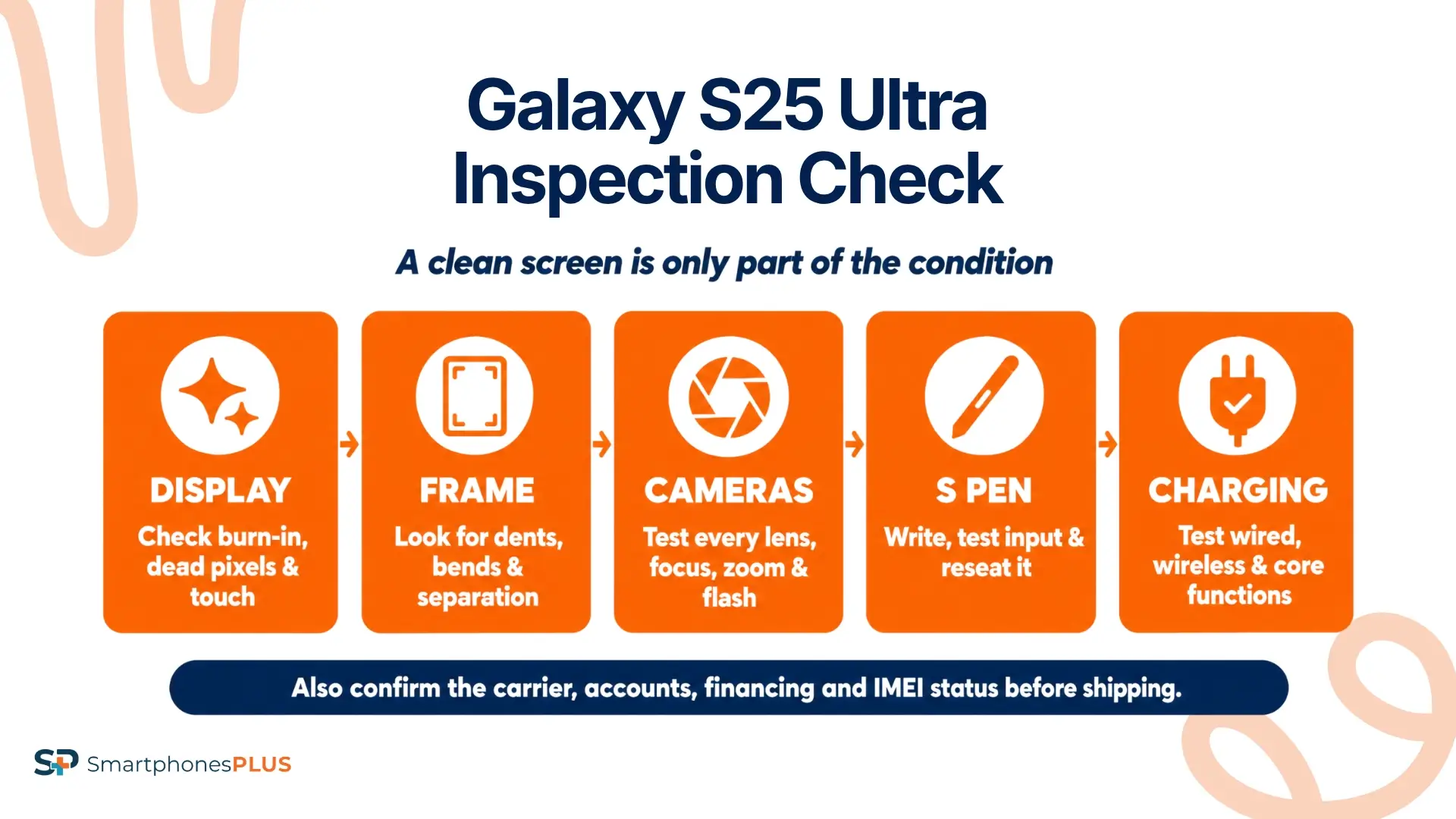
Inspection checks the details you submitted against the phone in the package. A clean front screen helps, but it doesn’t show how the cameras focus, if the S Pen works, or if an account is still connected.
Display and Frame
Remove the case and screen protector so you can see the edges of the glass. Check the display under bright light for cracks and deep scratches. Look around the titanium frame for dents, bends, gaps, or signs that the screen is lifting away from the body.
Open a plain white or light gray image at full screen. Look for app shapes that remain visible, uneven color, dark spots, or dead pixels. Move a finger across the entire display to check for areas that miss taps or swipes. Test the screen at more than one brightness level because faint burn-in or discoloration may be easier to see at a lower setting.
If you’re thinking, “I want to sell my Galaxy S25 Ultra in Good condition,” this is where a careful check can prevent a surprise. Screen burn, touch problems, frame separation, and cracked glass can move the phone into a lower condition.
Cameras and S Pen
Open the Camera app and test the front camera plus every rear lens. Take photos at the available zoom levels, tap different parts of the screen to change focus, and record a short video. Look for blur, shaking, black spots, warning messages, or a lens that won’t switch on. Test the flash separately.
Samsung lists the built-in S Pen as part of the Galaxy S25 Ultra. Remove it, write across several parts of the screen, and check that it slides back into the phone without sticking. If the S Pen is missing or damaged, include that when choosing the condition.
Charging and Core Functions
Connect a known working USB-C cable and move it gently near the port. An intermittent connection may point to debris, port wear, or internal damage. Test wireless charging too, then play audio through the speakers and record your voice to check the microphones.
Press the volume and side buttons several times. Connect to Wi-Fi and Bluetooth, test vibration, and confirm that fingerprint unlock works. A phone can look flawless and still have a functional issue that changes its condition.
Accounts, Carrier, and Financing
Confirm the carrier before selecting Unlocked. If you aren’t sure, contact the carrier and ask it to check the IMEI. A paid-off phone may still need a separate unlock request.
The SmartphonesPLUS product page says phones reported lost or stolen aren’t accepted. It also says an active Google or Samsung account prevents acceptance, and a balance or active account can reduce the value. Follow the company’s steps for removing Google and Samsung accounts, then check the financing and IMEI status separately.
Before you sell Samsung Galaxy S25 Ultra, make sure the carrier, payment status, and account details match what you plan to submit. A factory reset by itself may leave Google Device Protection active if accounts weren’t removed correctly first.
How Should You Grade the Condition?
Choose the live condition description that best matches both appearance and function. The self-check below helps you find issues before you submit a Galaxy S25 Ultra trade-in order.
| Area | Test | Result that may change condition | Quote detail to review |
| Display | Check plain backgrounds and touch every area | Burn-in, dead pixels, cracks, or missed touches | Compare Fair and Broken descriptions |
| Frame and glass | Remove the case and inspect every edge | Dents, bends, separation, or deep scratches | Match the visible wear honestly |
| Cameras | Test every lens, focus, zoom, video, and flash | Blur, shaking, spots, or a camera that fails | Review the functional requirements |
| S Pen | Write across the screen and reseat the pen | Missing pen, poor input, or a damaged slot | Confirm the current S Pen policy |
| Charging and sound | Test wired and wireless charging, speakers, and microphones | Intermittent charging or failed audio | Review the working-device requirements |
| Accounts and IMEI | Remove accounts and check carrier records | Active account, unpaid balance, or lost/stolen report | Confirm eligibility before shipping |
Run the check with the phone in your hands, then select the closest condition on the product page. If you’re saying, “I need to sell my Galaxy S25 Ultra soon,” a few extra checks can lower the chance of a revised quote.
The original box and charger don’t change the offer according to the current SmartphonesPLUS Samsung selling policy. The S Pen is different because it is built into the phone. Ask SmartphonesPLUS how a missing pen affects the quote instead of buying a replacement without checking the possible increase.
Should You Repair the S25 Ultra?
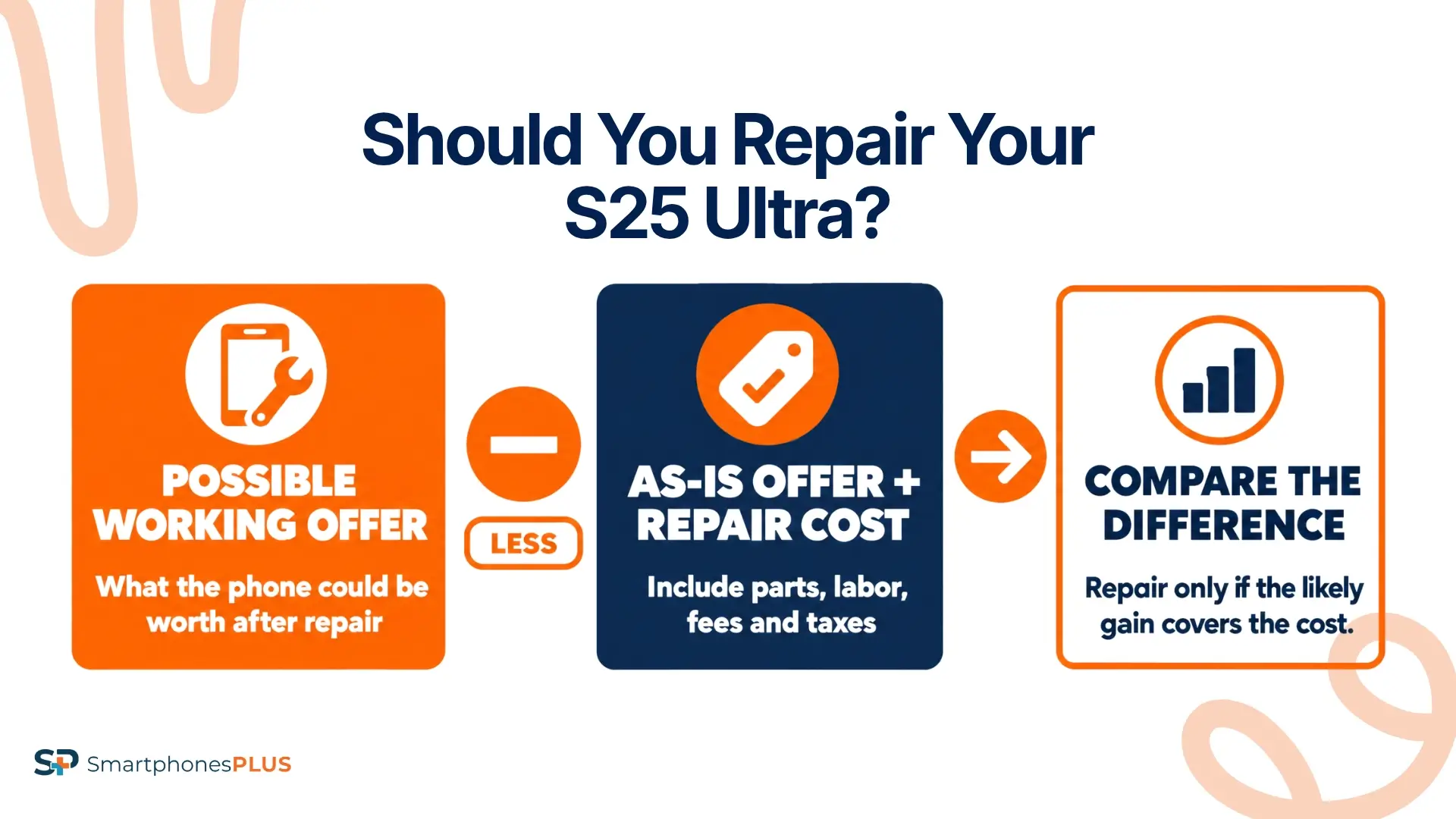
A repair may make sense when the increase in the working offer is greater than the full repair cost. Premium display and camera repairs can be expensive, and a successful repair doesn’t guarantee that the rest of the phone will qualify as Good.
For an unlocked 256GB example, the current Good offer is $500 with these product details. The Broken offer is $116 for this exact configuration.
Samsung listed a suggested Galaxy S25 Ultra screen module repair price of $279 when checked on September 4, 2026. Regional pricing, fees, and taxes can change the bill. To estimate the difference, subtract the as-is offer and repair cost from the possible working offer. This shows how much you could gain or lose by repairing the phone.
Don’t use the formula until a repair shop confirms the exact problem. A screen that looks cracked may also have frame or touch damage, and a repaired display won’t fix a camera or charging issue. Before you sell a Samsung Galaxy S25 Ultra with screen damage, check the live S25 Ultra value again and compare it with the full repair quote.
If you already have Samsung Care+, review the current claim terms before paying out of pocket. Coverage, service fees, repair availability, and exclusions can affect your cost. Buying new coverage after the damage isn’t part of this comparison.
How Do You Sell Samsung Galaxy S25 Ultra?
You can sell the Samsung Galaxy S25 Ultra after you’ve checked the exact model, storage, carrier, and condition. Use this order:
- Open the Galaxy S25 Ultra trade-in page.
- Select the correct storage and carrier.
- Run the display, camera, S Pen, and function checks above.
- Choose the condition that matches the phone.
- Review the live cash offer.
- Back up your data and remove the Google and Samsung accounts.
- Use Samsung’s factory reset steps through Settings.
- Remove the SIM, package the phone securely, and ship it for inspection.
If you’re thinking, “I’m ready to sell my Galaxy S25 Ultra,” don’t erase it until the backup has finished. You’ll receive payment after the phone’s submitted details are confirmed. SmartphonesPLUS may revise the offer if the inspected storage, carrier, condition, or account status is different.
Send the Phone You Described
A careful self-check can lower the chance of a revised offer. Make sure the display, cameras, S Pen, charging, and account status match the condition submitted with your Galaxy S25 Ultra trade-in quote.
New Galaxy releases, changing demand, and damage can affect the S25 Ultra value. If you want to sell a Samsung Galaxy S25 Ultra, test the phone first and then check its current offer.
Thinking “I want to sell my Galaxy S25 Ultra”? Start with the exact storage, carrier, and condition. You can also compare other models on the Sell Samsung phones for cash page.
Frequently Asked Questions
How do I sell Samsung Galaxy S25 Ultra?
Select the S25 Ultra, storage, carrier, and closest condition. Review the cash offer, back up the phone, remove your accounts, reset it through Settings, and ship it with the prepaid label. You’ll be paid after inspection confirms the submitted details.
Does a missing S Pen lower the offer?
It may affect the offer because the S Pen is built into the phone, but there isn’t one deduction that applies to every quote. Ask the SmartphonesPLUS support team how a missing or damaged S Pen changes the current condition before shipping.
Can I sell an S25 Ultra with burn-in?
The phone may still have an offer. Check the screen against a plain background, then choose the condition that includes its display issue. Don’t grade it only by cracks or exterior wear.
Can I sell a financed S25 Ultra?
Financing and physical condition are checked separately. The product page says a balance due or active carrier account can reduce the offer, so confirm the payoff and account status before shipping.
Do I need the box and charger?
No. SmartphonesPLUS says the charger and additional accessories don’t change the offer. Send only the items requested in your order instructions.


